Discussion 11: SQL
Attendance
Your TA will come around during discussion to check you in.
If you miss discussion for a good reason (such as sickness or a scheduling conflict), email cs61a@berkeley.edu within one week to receive attendance credit.
Visualizing SQL
The CS61A SQL Web Interpreter is a great tool for visualizing and debugging SQL statements!
To get started, visit code.cs61a.org and hit Start SQL interpreter on the launch screen.
Most tables used in assignments are already available for use, so let's try to execute a SELECT statement:
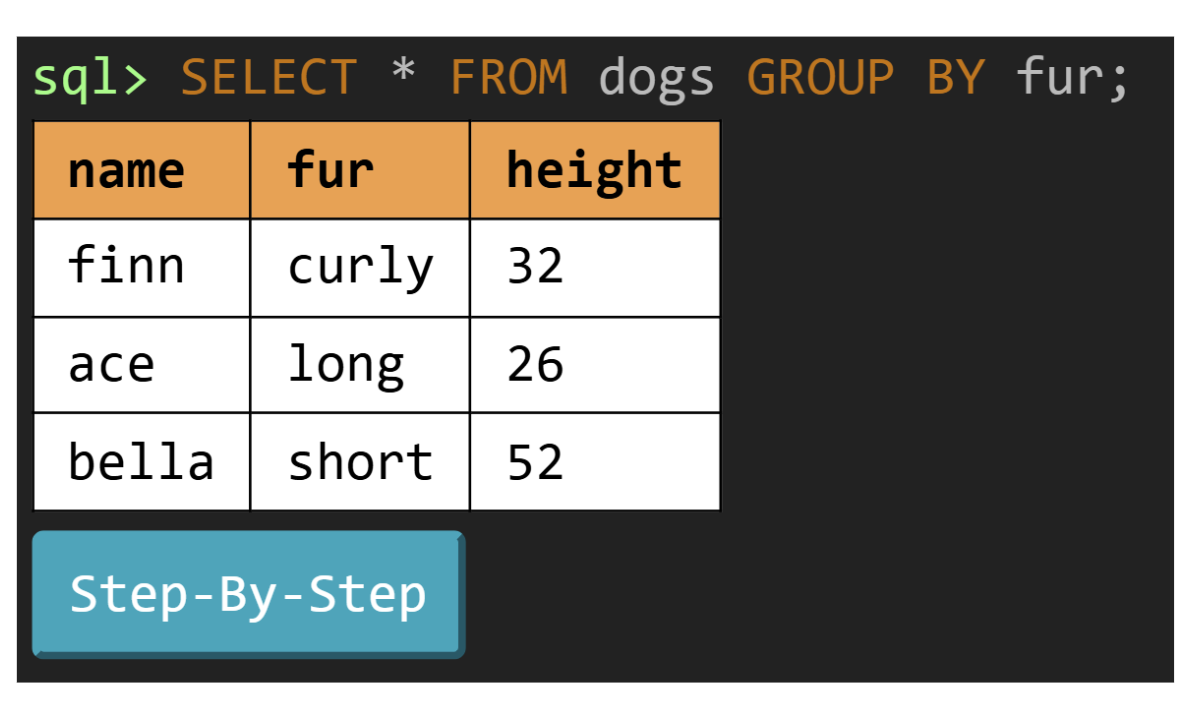
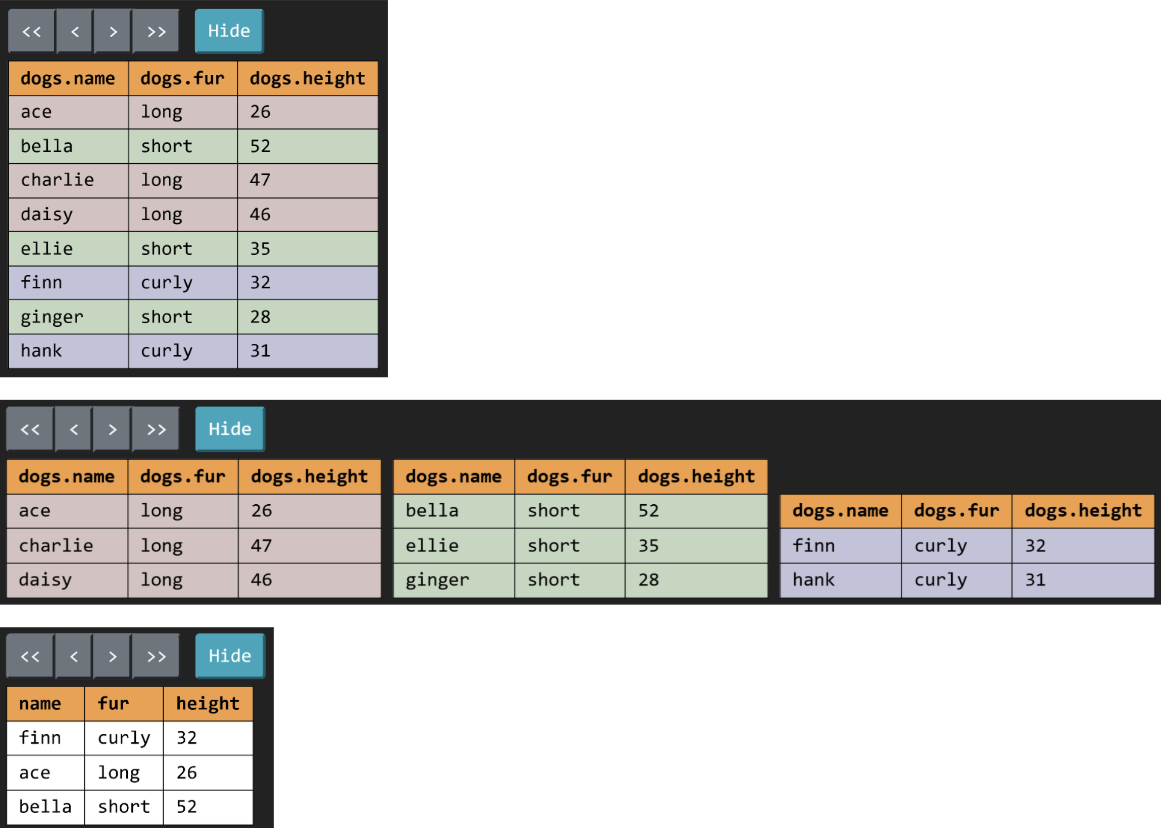
In addition to displaying a visual representation of the output table, the "Step-by-step" button lets us step through the SQL execution and visualize every transformation that takes place. For our example, clicking on the next arrow will produce the following visuals, demonstrating exactly how SQL is grouping our rows to form the final output!
SQL Basics
Example Table
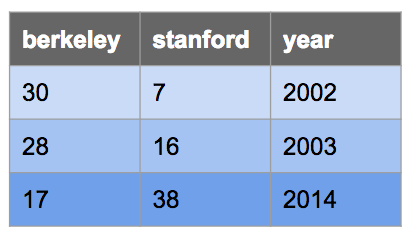
Here's a table called big_game used in the examples below, which records the
scores for the Big Game each year. This table has three columns: berkeley,
stanford, and year.
CREATE TABLE big_game (
    berkeley INTEGER, stanford INTEGER, year INTEGER);

INSERT INTO big_game (berkeley, stanford, year) VALUES
    (30, 7, 2002),
    (28, 16, 2003),
    (17, 38, 2014);
You can view it in sqlite like this:
sqlite> .mode column
sqlite> SELECT * FROM big_game;
berkeley  stanford  year
--------  --------  ----
30        7         2002
28        16        2003
17 38 2014.mode column command doesn't work in your version of sqlite, that's ok. Just ignore it.
Selecting From Tables
Typically, we will create a new table from existing tables using a SELECT statement:
SELECT [columns] FROM [tables] WHERE [condition] ORDER BY [columns] LIMIT [limit];Let's break down this statement:
SELECT [columns]tells SQL that we want to include the given columns in our output table;[columns]is a comma-separated list of column names, and*can be used to select all columnsFROM [table]tells SQL that the columns we want to select are from the given tableWHERE [condition]filters the output table by only including rows whose values satisfy the given[condition], a boolean expressionORDER BY [columns]orders the rows in the output table by the given comma-separated list of columns; by default, values are sorted in ascending order (ASC), but you can use DESC to sort in descending orderLIMIT [limit]limits the number of rows in the output table by the integer[limit]
Here are some examples:
Select all of Berkeley's scores from the big_game table, but only include
scores from years past 2002:
sqlite> SELECT berkeley FROM big_game WHERE year > 2002;
28
17
Select the scores for both schools in years that Berkeley won:
sqlite> SELECT berkeley, stanford FROM big_game WHERE berkeley > stanford;
30|7
28|16
Select the years that Stanford scored more than 15 points:
sqlite> SELECT year FROM big_game WHERE stanford > 15;
2003
2014
SQL operators
Expressions in the SELECT, WHERE, and ORDER BY clauses can contain
one or more of the following operators:
- comparison operators:
=,>,<,<=,>=,<>or!=("not equal") - boolean operators:
AND,OR - arithmetic operators:
+,-,*,/ - concatenation operator:
||
Output the ratio of Berkeley's score to Stanford's score each year:
sqlite> select berkeley * 1.0 / stanford from big_game;
0.447368421052632
1.75
4.28571428571429
Output the sum of scores in years where both teams scored over 10 points:
sqlite> select berkeley + stanford from big_game where berkeley > 10 and stanford > 10;
55
44
Output a table with a single column and single row containing the value "hello world":
sqlite> SELECT "hello" || " " || "world";
hello world
Pizza Time
The pizzas table contains the names, opening, and closing hours of great pizza
places in Berkeley. The meals table contains typical meal times (for college
students). A pizza place is open for a meal if the meal time is at or within the
open and close times.
CREATE TABLE pizzas (name TEXT, open INTEGER, close INTEGER);

INSERT INTO pizzas VALUES
  ("Artichoke", 12, 15),
  ("La Val's", 11, 22),
  ("Sliver", 11, 20),
  ("Cheeseboard", 16, 23),
  ("Emilia's", 13, 18);

CREATE TABLE meals (meal TEXT, time INTEGER);

INSERT INTO meals VALUES
  ("breakfast", 11),
  ("lunch", 13),
  ("dinner", 19),
  ("snack", 22);
Q1: Open Early
You'd like to have pizza before 13 o'clock (1pm). Create a opening table with
the names of all pizza places that open before 13 o'clock, listed in reverse
alphabetical order. To test what table your query outputs, press the green play button in 61A Code!
opening table:
| name |
|---|
| Sliver |
| La Val's |
| Artichoke |
Q2: Study Session
You're planning to study at a pizza place from the moment it opens until 14
o'clock (2pm). Create a table study with two columns, the name of each pizza
place and the duration of the study session you would have if you studied there
(the difference between when it opens and 14 o'clock). For pizza places that are
not open before 2pm, the duration should be zero. Order the
rows by decreasing duration.
Hint: Use an expression of the form MAX(_, 0) to make sure a result is not below 0.
study table:
| name | duration |
|---|---|
| La Val's | 3 |
| Sliver | 3 |
| Artichoke | 2 |
| Emilia's | 1 |
| Cheeseboard | 0 |
Q3: Late Night Snack
What's still open for a late night snack? Create a late table with one
column named status that has a sentence describing the closing time of each
pizza place that closes at or after snack time. Important: Don't use any
numbers in your SQL query! Instead, use a join to compare each restaurant's
closing time to the time of a snack. The rows may appear in any order.
late table:
| status |
|---|
| Cheeseboard closes at 23 |
| La Val's closes at 22 |
The || operator in SQL concatenates two strings together, just like + in Python.
close time to the time of a snack:
- join the
pizzasandmealstables usingFROM pizzas, meals - use only rows where the
mealis a"snack" - compare the
timeof the snack to thecloseof the pizza place.
name || " closes at " || close to create the sentences in the resulting table. The || operator concatenates values into strings.
Q4: Double Pizza
If two meals are more than 6 hours apart, then there's nothing wrong with going
to the same pizza place for both, right? Create a double table with three
columns. The first column is the earlier meal, the second column is the
later meal, and the name column is the name of a pizza place. Only include
rows that describe two meals that are more than 6 hours apart and a pizza
place that is open for both of the meals. The rows may appear in any order.
double table:
| first | second | name |
|---|---|---|
| breakfast | dinner | La Val's |
| breakfast | dinner | Sliver |
| breakfast | snack | La Val's |
| lunch | snack | La Val's |
SQL Aggregation
Here's another example table, this time about flights:
CREATE TABLE flights (
    departure TEXT, arrival TEXT, price INTEGER);

INSERT INTO flights (departure, arrival, price) VALUES
    ('SFO', 'LAX', 97),
    ('SFO', 'AUH', 848),
    ('LAX', 'SLC', 115),
    ('SFO', 'PDX', 192),
    ('AUH', 'SEA', 932),
    ('SLC', 'PDX', 79),
    ('SFO', 'LAS', 40),
    ('SLC', 'LAX', 117),
    ('SEA', 'PDX', 32),
    ('SLC', 'SEA', 42),
    ('SFO', 'SLC', 97),
    ('LAS', 'SLC', 50),
    ('LAX', 'PDX', 89);
Applying an aggregate function
such as MAX(column) combines the values from multiple rows into an output row.
By default, we combine the values of all rows in the table. For example, if we
wanted to count the number of rows in our flights table, we could use:
sqlite> SELECT COUNT(*) from FLIGHTS;
13
What if we wanted to group together the values in similar rows and perform the
aggregation operations within those groups? We use a GROUP BY clause.
Here's another example. For each unique departure, collect all of the rows having
the same departure airport into a group. Then, select the price column and
apply the MIN aggregation to recover the price of the cheapest departure from
that group. The end result is a table of departure airports and the cheapest
departing flight.
sqlite> SELECT departure, MIN(price) FROM flights GROUP BY departure;
departure  MIN(price)
---------  ----------
AUH        932
LAS        50
LAX        89
SEA        32
SFO        40
SLC        42
Just like how we can filter out rows with WHERE, we can also filter out
groups with HAVING. Typically, a HAVING clause should use an aggregation
function. Suppose we want to see all airports with at least two departures:
sqlite> SELECT departure FROM flights GROUP BY departure HAVING COUNT(*) >= 2;
departure
---------
LAX
SFO
SLC
Note that the COUNT(*) aggregate just counts the number of rows in each group.
Say we want to count the number of distinct airports instead. Then, we could
use the following query:
sqlite> SELECT COUNT(DISTINCT departure) AS destinations FROM flights;
destinations
------------
6
This enumerates all the different departure airports available in our flights
table (in this case: SFO, LAX, AUH, SLC, SEA, and LAS).
Rooms
From the Spring 2023 final exam.
The finals table has columns hall (strings) and course (strings), and has
rows for the lecture halls in which a course is holding its final exam.
The sizes table has columns room (strings) and seats (numbers), and has one
row per unique room on campus containing the number of seats in that room. All
lecture halls are rooms.
Q5: Total Seats
Create a table with two columns, course (strings) and total (numbers) that
has a row for each course that uses at least two rooms for its final. Each
row contains the name of the course and the total number of seats in final rooms
for that course.
Your query should work correctly for any data that might appear in the finals
and sizes table, but for the example data above the result should be:
61A|2400
61B|1700
61C|1200Join the finals and sizes tables, but make sure that each joined row is
coherent by restricting to rows in which the hall (from finals) and room
(from sizes) are the same value.
Since the output has one row per course, but the same course appears in multiple
rows of the finals table, group by course.
COUNT(*) evaluates to the number of input rows in a group, which in this case
will be the number of rooms used by a course.
The expression SUM(seats) evaluates to the sum of the seats values (from the
sizes table) for a group. If there is one group per course, then this will be
the sum of seats in all lecture halls used for that course.
Q6: Room Sharing
Write one select statement that creates a table with two columns, course
(strings) and shared (numbers) that has a row for each course using at least
one room that is also used by another course. Each row contains the name of
the course and the total number of rooms for that course which are also used
by another course.
COUNT(DISTINCT x) evaluates to the number of distinct values
that appear in column x for a group. For example, SELECT COUNT(DISTINCT seats) from sizes;
would output 8, because there are 9 rows in sizes, but two rows have 300 seats,
so there are only 8 distinct values.
Your query should work correctly for any data that might appear in the finals
and sizes table, but for the example below the result should be:
61A|3
61B|2
61C|2
70|1
Discussion Time: Talk about why the output table contains what it contains. Which are the two halls for 61B that are shared?
Join finals with finals, but make sure that the joined rows are for
difference courses using the same lecture hall.
Group by the first course column to make one group (and one output row) per
course. A HAVING clause is not needed if the WHERE clause has already
limited the input rows to those with two different courses using the same hall.
Count the distinct number of hall values for a course: COUNT(DISTINCT ___).
The DISTINCT restriction is needed so that a hall used by more than two
courses is not counted more than once.